Utilisation :
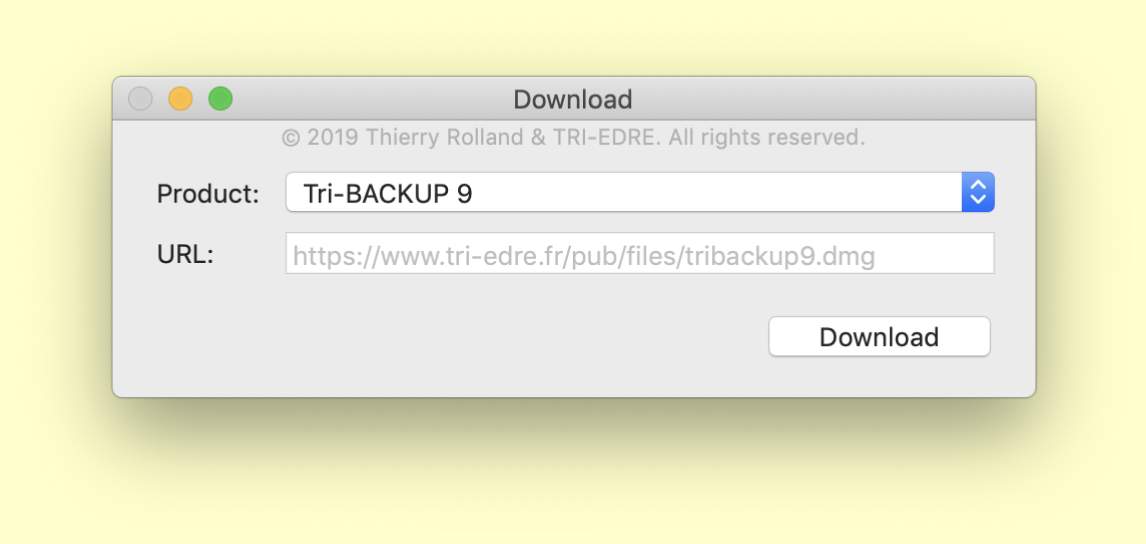
"Download" est très simple d'utilisation :
- choisissez le produit désiré dans le menu "Product".
- cliquez sur le bouton "Download" pour le télécharger.
Le produit sera téléchargé dans le dossier "Téléchargements".
Vérifiez que le dossier "Téléchargements" ne contient pas
déjà un élément de même nom.
Use:
"Download" is very easy to use:
- Choose the desired product in the "Product" menu.
- Click on the "Download" button to start the download.
The product will be downloaded in the "Downloads" folder.
Check that the "Downloads" folder does not contain
an item with same name.